Email automation is here 📬
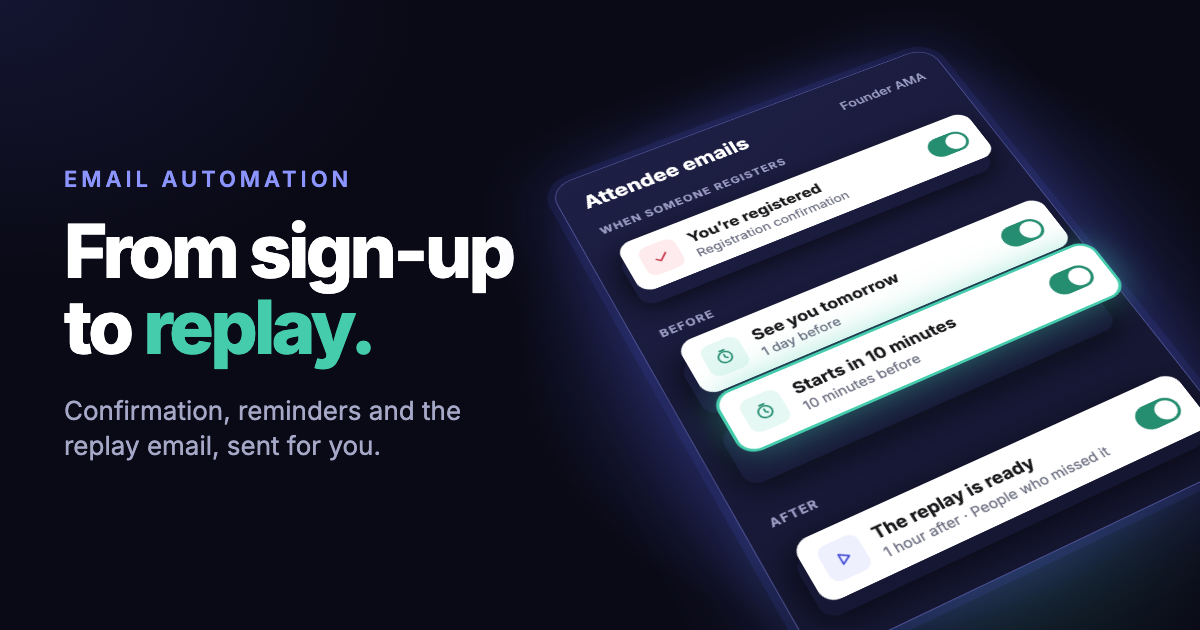
Reminders and follow-ups do a lot of the work of getting people to show up and come back. Now you can plan every one of them in one place.
The new Attendee emails section lets you choose what attendees get when they register, before each session, and after it ends, and write each email in a simple editor with a live preview.
Every new event starts with a reminder a day before and another 10 minutes before. Add your own from 5 minutes to 30 days ahead, and send follow-ups to everyone registered or only to the people who attended, missed it, or haven’t watched the replay yet.
Set your defaults once on your channel’s Attendee Emails settings page, and every new event starts with them.
To set up your attendee emails:
- Open your event and go to Attendee emails.
- Under Before and After, review the standard emails, or choose Add reminder or Add follow-up.
- Open any email to edit it, and use Send a test to me before you save.
Every plan includes the standard reminders and follow-up. Pro and Business add custom timing, audience targeting, more emails per event, and Advanced HTML.
Learn more: How to set up email automation →
✨ Improvements
- One editor for every attendee email — Email your audience and your registration confirmation now use the same editor, and the confirmation can say something different to people who registered themselves and people you added by import or API.
- Emails that look like yours — Event emails have a refreshed design, show your channel as the sender (“Your Channel via Crowdcast”), and follow your primary color.
- Rewind a live stream — Viewers can seek back during a live event and jump back to live when they’re ready.
- Clearer RTMP setup — The RTMP card shows whether it’s waiting for a signal or your encoder is connected, before you go live.
- Know how long a video will take — Studio shows the elapsed time and expected wait while an uploaded video prepares.
- Fewer sign-up typos — Registration suggests a correction when an email looks mistyped, such as gmail.con.
- Safer device switching — Crowdcast asks before a second device takes over a live session.
🐞 Fixes
- Host screen shares stay live through brief connection drops, and an ended screen share now clears from the stage.
- Hosts can upload a replay when the original recording is missing.
- Multi-select registration answers that contain commas now save correctly.
- Vimeo intro videos start reliably for hosts.
- Sign-in links work more reliably on unstable mobile connections.